How to get your business on Google Maps
Create or claim a free Google Business Profile at business.google.com/add, verify it, then fill in your hours, services and photos. Here’s the order that works, with the steps Irish businesses most often get stuck on.

Updated 10 min read
Get your free Google profile check
No obligation. Trusted by 10+ clients.
Free Google profile checkFindings by email within 24 hours.
Get my free checkThe five steps at a glance
A Google Business Profile is free, and it’s what puts your business on Google Maps and in the map results on Google Search. Most businesses can do the first three steps in an afternoon.
- 1CheckSearch your name and town on Google Maps
You may already be listed. If so, you claim that listing instead of starting again.
- 2Addbusiness.google.com/add
Your real name, main category and where you serve customers.
- 3VerifyGoogle picks the method
Video, phone, email, a live video call or a postcard. Then a review of up to 5 business days.
- 4Fill inHours, services, photos
The details that decide which searches you show up for.
- 5Keep it activeReviews, photos, holiday hours
A profile that looks looked-after gets chosen.
What is a Google Business Profile?
A Google Business Profile is your free business listing on Google Search and Google Maps. It shows your name, location or service area, phone number, hours, photos and reviews, and you control it once it’s verified.
It used to be called Google My Business. Google renamed it in November 2021, so older guides and some sales emails still use the old name. It’s the same thing.
- What it is
- Your free business listing on Google Search and Maps
- Old name
- Google My Business, renamed in November 2021
- Cost
- Free. Ads above the map are a separate, paid product
- Who can have one
- Businesses that meet customers in person, at an address or at the customer’s location
- Where to start
- business.google.com/add, or claim an existing listing from Google Maps
- Account needed
- A Google Account, which can use your business email instead of Gmail
- Review after verifying
- Up to 5 business days
Step 1: Check whether you’re already on Google
Search for your business name and town on Google Maps. Google sometimes creates a listing from public information. And a previous owner, a web designer or an old agency may have set one up years ago.
- Found it, and nobody manages itSelect “Claim this business”, then “Manage now”, and follow the steps. You can do this in the Google Maps app too, under the listing’s About tab.
- Found it, but someone else manages itRequest ownership through Google. The current owner is asked to respond. If it’s an old agency or a former employee, contact them as well, since that’s often quicker.
- Not there at allGo on to step 2 and add it.
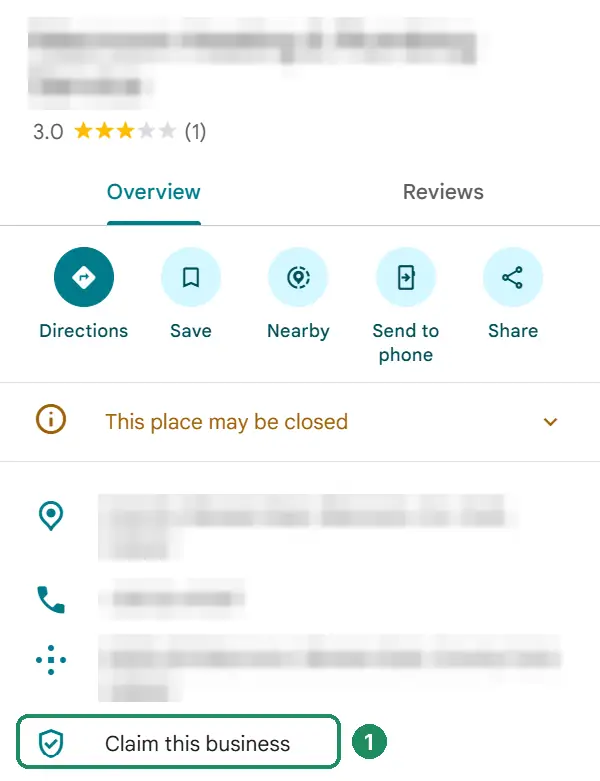
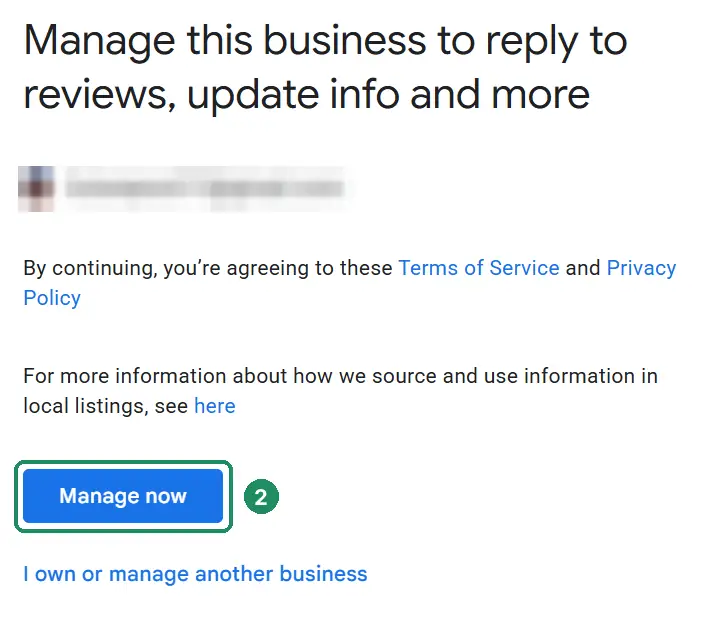
Don’t create a second profile to get around an old one. Google’s rules allow one profile per business, and duplicates split your reviews.
Step 2: Add your business
Go to business.google.com/add, select “Add your business to Google” and sign in. You need a Google Account, but it doesn’t have to be a Gmail address: your business email works.
- Business nameExactly as it appears on your signage, van and invoices. Google asks you to represent your business the way it’s known in the real world. So adding towns or services to the name breaks the rules.
- Main categoryThe one that best describes your business. It has a big effect on which searches you show up for. See choosing your Google Business Profile category.
- LocationIf customers come to you, add your address. If you go to them, don’t show your address: list the areas you cover instead. See Google Business Profile without a shopfront.
- Phone and websiteThe number customers should ring, and the page on your site that best matches the profile.
Step 3: Verify your business
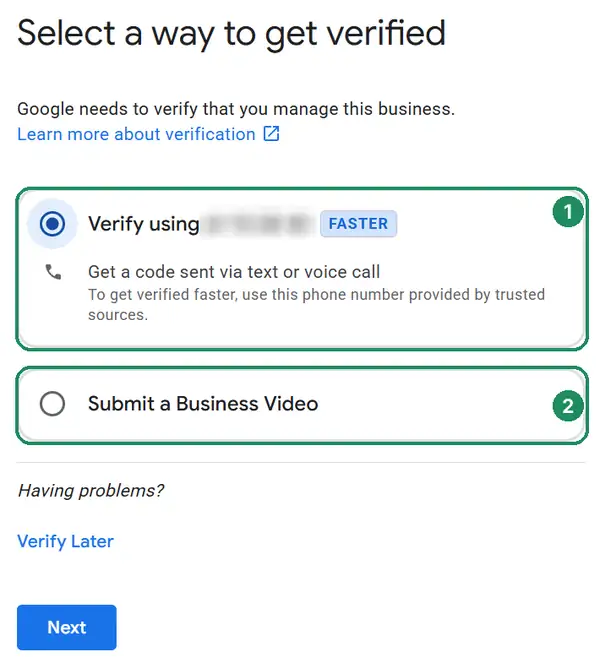
Google decides which verification methods you’re offered, based on your business type, public information, region and opening hours, and you can’t change them. Sometimes you’ll need more than one.
Video recording
A short, continuous video of your location, your business and proof it’s yours.
Phone call or text
A code sent to your business number.
Automated phone menus won’t receive it.
A code or link sent to the address on screen.
Make sure you can open that inbox.
Live video call
A call with Google support, during your business hours.
Be at your premises, ready to show it.
Postcard
A 5-digit code posted to your address.
Not offered to every business.
If you’re offered video
Film in one continuous take, and show three things:
Where you are: your sign, the street or nearby businesses, or your van parked outside.
What you do: your tools, equipment, stock or branded materials.
That it’s yours: opening the premises with your keys, an employee-only area, or business paperwork with nothing sensitive on it.
If you get a postcard
- Day 0
Request the code. Check the mailing address first, with your Eircode.
- Day 14
Most codes have arrived. Until then, don’t edit your name, address or category, and don’t request a new code: either one cancels the code that’s on its way.
- Day 30
The code expires. Enter it on your profile before then.
- Then
Google reviews your details, which takes up to 5 business days. You’ll get an email when you’re verified.
Three things worth knowing
- Search Console can speed it upGoogle says it sometimes verifies a profile instantly when your website is already verified in Google Search Console with the same account.
- Never share your codeGoogle says it will never ask for your verification code. Anyone who rings asking for it isn’t Google.
- Video rejected?Our free Profile Rescue Kit tells you what was probably missing and writes a shot-by-shot script for your next video.
Step 4: Fill in what matters
Once you’re verified, add your opening hours, and every service you offer in plain words. Then add a short description, and real photos of your team, premises, van and finished work. These details decide which searches you show up for and whether people pick you.
Our Google Business Profile guides cover each part. And how to rank higher on Google Maps covers what moves you up once you’re on the map.
Step 5: Keep it active
Reply to every review, add new photos now and then, and keep your hours right, including bank holidays. A profile that looks looked-after gets more calls than one last touched years ago. For a steady flow of new reviews, see how to get more Google reviews.
Why isn’t my business showing on Google Maps?
Usually because the profile isn’t verified yet, is still being reviewed, or has been suspended. Check these in order:
Search your business name and town in a private window. If you show up, you’re on the map. Not showing for a search like “plumber cork” is a ranking problem, not a listing problem.
Check you’re verified. Google only shows verified businesses’ information on Maps and Search.
Give it time. Google’s review after verifying takes up to 5 business days. Edits can take up to 3 days to appear. And Google says rankings for a new business can take up to a month to appear in search results.
Check for a suspension. If your profile breaks Google’s guidelines, it’s suspended or disabled and hidden until you fix it. You’ll get a notification in the Google Account that manages the profile. Our free Profile Rescue Kit finds the likely cause and writes your appeal.
Check the pin. If your business shows in the wrong place, add your Eircode and drag the pin to your door. If Google Maps can’t find your Eircode at all, see Eircode not showing on Google Maps.
Getting it right in Ireland
A few things trip up Irish businesses in particular.
- Put your Eircode in the addressIt helps the postcard arrive and the pin land in the right place. Rural addresses often share a townland name, so check the pin and drag it to your actual door if it’s wrong. Use the same address on every other listing too: see the best business directories in Ireland.
- Use a number someone answersVerification calls and texts go to your business number, and automated phone menus won’t receive the code. An Irish mobile is fine if that’s what customers ring.
- Describe your work the Irish wayYour services and description should use the words people here search: “boiler service”, “immersion repair”, “end of tenancy clean”, not wording borrowed from American templates.
- Set special hours for every public holidayCustomers who turn up to a closed door leave reviews. Ireland has 10 public holidays, listed below. Good Friday isn’t one, but if you close, set special hours for it too.
| Public holiday | When it falls | Next one |
|---|---|---|
| New Year’s Day | 1 January | 1 January 2027 |
| St Brigid’s Day | First Monday in February (or 1 February if it’s a Friday) | 1 February 2027 |
| St Patrick’s Day | 17 March | 17 March 2027 |
| Easter Monday | The Monday after Easter | 29 March 2027 |
| May bank holiday | First Monday in May | 3 May 2027 |
| June bank holiday | First Monday in June | 7 June 2027 |
| August bank holiday | First Monday in August | 2 August 2027 |
| October bank holiday | Last Monday in October | 25 October 2027 |
| Christmas Day | 25 December | 25 December 2026 |
| St Stephen’s Day | 26 December | 26 December 2026 |
Public holiday dates from Citizens Information.
Mistakes that cause problems later
All of these are common, and all of them are easier to avoid than to fix.
| Mistake | What it looks like | What happens |
|---|---|---|
| Keywords in the business name | “Murphy Plumbing Cork Emergency 24hr” | Breaks Google’s guidelines for representing your business, and is a common cause of suspension |
| A second profile instead of claiming the first | Two listings for one business | Splits reviews; Google may suspend or merge them |
| Showing a home address you don’t serve customers at | Your house on the map | Not allowed for service-area businesses, and a privacy risk |
| Editing during verification | Changing the category while a postcard is on its way | Cancels the code, and you start again |
| A virtual office or PO box as your address | A rented mailing address | Not eligible: Google requires a real location |
When to get help
Setting up a profile is free, and most people can do it themselves. It’s worth getting help in four cases. Verification keeps failing. Someone else controls your listing and won’t hand it over. The profile has been suspended. Or you’re on the map, but never for the searches that bring in work.
That’s what our Google Business Profile management covers, and the free Google profile check will tell you which of these applies to you. If you only need the profile sorted once, the one-off profile fix-up is €149 on our pricing page.
Questions people ask
Something else on your mind? Email info@leadsireland.com.
Is a Google Business Profile free?
Yes. Google doesn’t charge for the profile or for appearing on Google Maps. The ads you sometimes see above the map are a separate, paid product. And Google says there’s no way to pay for a better local ranking.
How long does it take to show up on Google Maps?
After you verify, Google reviews your details, which can take up to 5 business days. If you verify by postcard, most codes arrive within 14 days. Google says rankings for a new business can take up to a month to appear in search results.
Is Google My Business the same as Google Business Profile?
Yes. Google renamed Google My Business to Google Business Profile in November 2021. It’s the same free listing on Google Search and Maps.
Do I need a Gmail address?
No. You need a Google Account, but you can create one with your business email address.
Why can’t I verify by postcard?
Google chooses which verification methods you’re offered, based on your business type, public information, region and opening hours, and you can’t change them. Postcards aren’t available to every business, so use one of the methods you’re offered.
What if someone else controls my listing?
If the listing is unverified, you can claim it from Google Maps. If it’s already verified, request ownership and the current owner is asked to respond. If it’s an old agency or a former employee, contact them as well, since that’s often quicker.
Why isn’t my business showing on Google Maps?
Usually because the profile isn’t verified yet, is still under review, or has been suspended. Search your business name and town in a private window: if it shows, you’re on the map and the issue is ranking, not visibility.
Why does Google show my business in the wrong place?
Usually because the address is shared with other homes or matches a townland rather than your building. Add your Eircode and move the pin to your actual location in your profile settings.
Can someone from Google ask me for my verification code?
No. Google says it will never ask for your verification code, so don’t share it with anyone, even people who help manage your profile.
Reviews and real leads
What clients say about Essa’s work. And leads that came in through sites he does SEO for.
“Since then, my site ranks higher and more people find it on Google. … I’d recommend him to anyone who needs help with SEO.”
“He’s an incredibly talented and knowledgeable individual, not only in SEO but in various fields. … He has constantly delivered phenomenal outputs.”
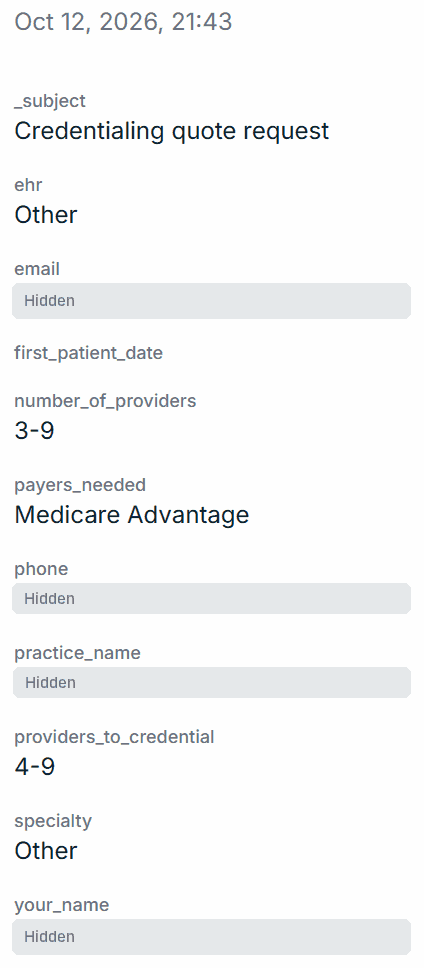
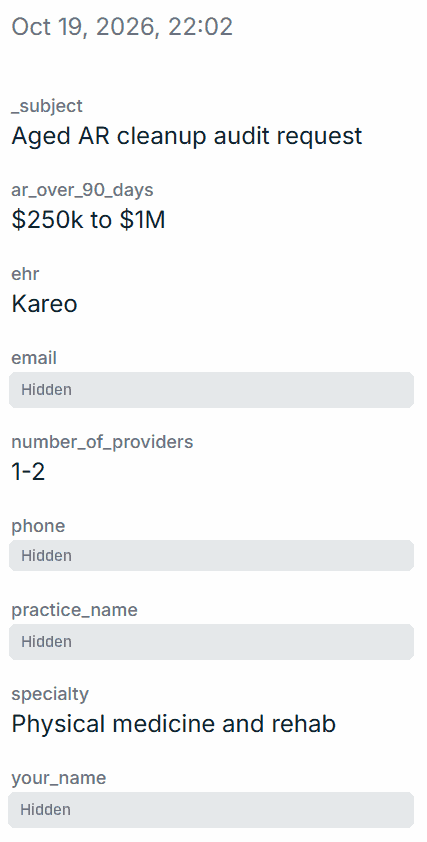
$100k+ lead
Aged AR audit request
Physical medicine and rehab · $250k–$1M unpaid over 90 days
Quilven · 19 October 2026
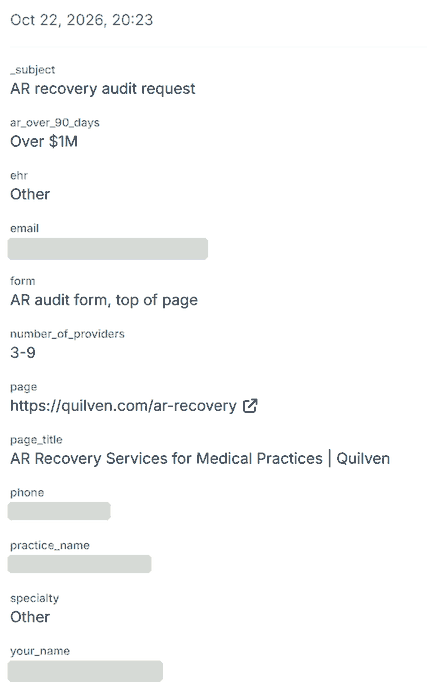
$100k+ lead
AR recovery audit request
3–9 providers · over $1M unpaid over 90 days
Quilven · 22 October 2026
Read the full messages on our reviews page, or see how the Quilven leads came in. Worked with us? Review us on Trustpilot.
See where you stand on the map.
Get a free audit of your Google Business Profile and website. You’ll see where you appear on the map, who’s above you and what to fix first.
- Your profile compared with the top three
- Findings within 24 hours, in plain English
- No obligation and no hard sell
Get your free SEO audit
Or book a free 20-minute call instead. It takes 30 seconds.