Google Business Profile without a shopfront
Yes, you can have a Google Business Profile with no shopfront and no public address. If you work from home or go to your customers, you set up as a service-area business: Google keeps your address hidden and shows the areas you cover instead. Here’s how to set it up, choose your areas and get verified from home.

Updated 11 min read
Free website audit or SEO consultation
No obligation. Trusted by 10+ clients.
Free SEO auditFindings by email within 24 hours.
Get my free auditCan you have a Google Business Profile without a shopfront?
Yes, as long as you meet your customers in person. Google calls a business that visits or delivers to customers, but doesn’t serve them at its own address, a service-area business. You keep a real address on file so Google can verify you, hide it from the public, and list up to 20 areas you serve.
- Who it’s for
- Businesses that go to their customers or deliver to them, like trades, cleaners and mobile services
- Your address
- Needed to verify you, then hidden from customers
- What customers see
- The areas you serve, outlined on Google Maps instead of a pin
- Service areas
- Up to 20 towns, cities, counties or postal areas
- How far
- About two hours’ drive from where you’re based. Google says larger areas may suit some businesses
- Radius
- Not allowed. You choose named places instead
- Changes
- Approved service-area edits can take up to 48 hours to show
- Not allowed
- PO boxes, virtual offices, and co-working desks without your sign and staff
- Online only
- Not eligible. Google needs face-to-face contact with customers
Which type of business are you?
Google sorts every profile into one of three types. Your type decides whether your address shows, and whether you add service areas.
Shopfront business
Customers come to you, at an address with your sign up and your staff there during your hours.
Show your address. A café, a salon, a car repair garage.
Service-area business
You go to your customers or deliver to them, and they don’t come to you.
Hide your address and add service areas. A plumber, a window cleaner, a mobile dog groomer.
Hybrid business
Customers visit your premises, and you also go out to them.
Show your address and add service areas. A garden centre that delivers, a garage with a recovery truck.
Not sure which you are? Answer these in order.
1Do you meet your customers face to face, at your place or theirs?
NoOnline-only businesses can’t have a profile. Put the work into your website instead: see how to make your website SEO friendly.
2Can customers visit your address during your hours, with your sign up and your staff there?
NoYou’re a service-area business. Hide your address and add the areas you serve.
3Do you also travel or deliver to customers?
NoYou’re a shopfront business. Show your address. You don’t need service areas.
Yes to all threeYou’re a hybrid business. Show your address and add service areas as well.
What customers see, and what stays private
With your address hidden, your profile looks like any other, except there’s no pin. Google Maps outlines the areas you serve instead.
Shown on your profile
- Your business name, phone number and website
- Your hours, services, photos and reviews
- The areas you serve, outlined on the map
Kept private
- Your street address and Eircode
- A pin on your house
- Directions to your door
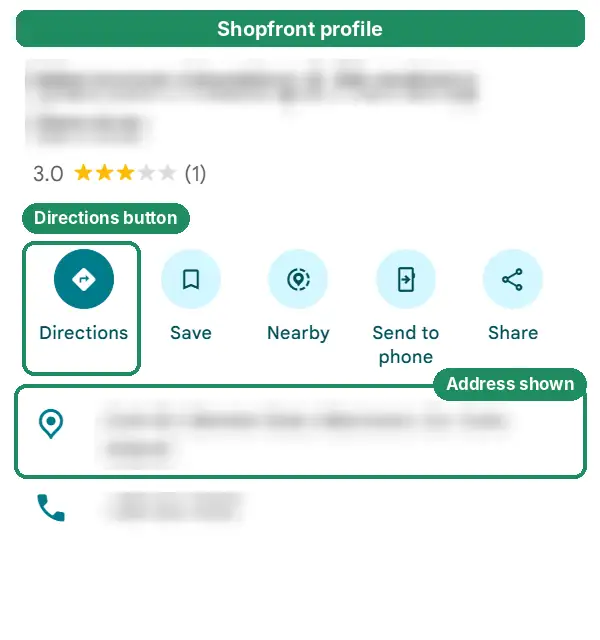
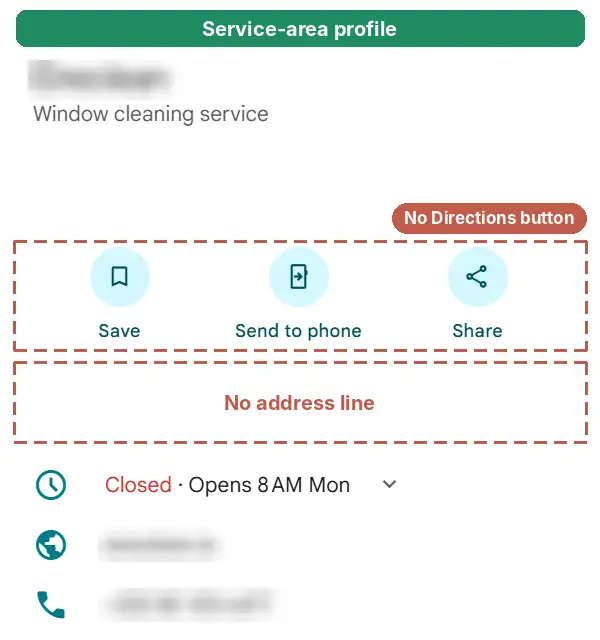
One side effect: with no pin, people scrolling around the map won’t see you on the map itself, only in the list of results. That’s normal for a service-area business, and it doesn’t mean your profile is missing.
How to set up a profile without showing your address
Setting up is quick. Verifying takes longer, so it has its own section below. For the full walkthrough, see how to get your business on Google Maps.
Go to business.google.com/add and enter your business name. Use the name on your van, invoices and sign. Google’s rules don’t allow extra words, like your town or your services.
Choose your main category. It’s the most important choice you’ll make here. See choosing your Google Business Profile category.
When Google asks if you want to add a location customers can visit, choose No. That’s what makes you a service-area business.
Add the areas you serve. Start typing a town, a county or a Dublin postal district, and pick it from the list Google suggests.
Add your phone number and website, then verify. Google still asks for your address so it can verify you. It isn’t shown to customers.
Set your hours for when you answer the phone and take jobs. If you only work by appointment, Google’s guidelines say not to list opening hours at all.
Already on Google with your address showing?
If customers don’t come to you, Google’s guidelines say to hide your address. On a verified profile that’s a switch in your settings, not a fresh start.
Open your profile while signed in on Google Search or Maps, and select Edit profile.
Go to Location, then Business location, and select the edit icon.
Turn off “Show business address to customers” and save.
Under Service area, add the places you cover. You can add up to 20.
Your address stays on file, so you keep your reviews and history. Google reviews changes like this, and approved service-area edits can take up to 48 hours to show. Don’t delete the profile and start again: you’d lose your reviews.
How to choose your service areas
List up to 20 places where you really work, named the way your customers name them. Keep the whole area within about two hours’ drive of your base.
Both limits come from Google’s help page on managing your service areas.
- Use the names customers useIn Dublin that’s often a postal district, like Dublin 6 or Dublin 15. Elsewhere it’s the town, or the county if you cover most of it.
- Pick towns over townlandsTwenty small townlands use up all your slots and cover less ground than a handful of towns.
- Forget the radiusGoogle no longer lets you set a radius around your base. An old radius area can’t be edited, so replace it with named places.
- Only list places you’ll go toService areas tell customers where you work. If you wouldn’t take a job in a town, leave it off.
A plumber based in Ballincollig
- Ballincollig
- Cork
- Bishopstown
- Douglas
- Carrigaline
- Blarney
- Ovens
- Macroom
Every place is well under an hour away, and named the way people there search.
The same plumber, overreaching
- Ireland
- Munster
- Dublin
- Galway
- 20 townlands near home
Dublin and Galway are more than two hours’ drive away. Ireland and Munster are far more than one van covers. And 20 townlands waste your slots.
How to verify when you work from home
Google chooses how you verify. If you’re offered a video, it has to be one continuous, unedited take of at least 30 seconds, filmed live: Google doesn’t accept pre-recorded videos.
This shot list covers what Google asks a service-area business to show.
- 1Where you’re basedStreet signs or landmarks near your address
Working from home? Google says signs and landmarks in your immediate neighbourhood are fine. Avoid filming empty land or places with nothing to identify them.
- 2What you doYour tools, equipment or products
The professional kit you actually use for the work.
- 3That it’s yoursUnlock your branded van, or do part of a job
Google wants to see you doing the work, or getting into something only the business has access to.
- 4Paperwork, if you have itAn invoice, utility bill or business permit
The name on it has to match the name on your profile.
Keep out of shot: other people’s faces, bank account, tax and ID numbers, and private information about you or anyone else.
In Ireland, this trips up sole traders whose trading name isn’t their own name, because bills in your own name won’t match your profile. You can register a trading name with the Companies Registration Office using form RBN1 (RBN1A for a partnership, RBN1B for a company). That gives you a certificate in that name. Invoices with your trading name on them help too.
If Google offers you a phone call, text or email instead, see step 3 of how to get your business on Google Maps.
What’s allowed, and what gets profiles suspended
Most of Google’s rules come down to one idea: one profile per business, at a real place you work from.
The full list is in Google’s guidelines for representing your business.
| Your setup | Allowed? | What to do |
|---|---|---|
| You work from home and customers don’t visit | Yes | Hide your address and add service areas |
| Your home address shows, but customers never come | No | Hide it. Google says service-area businesses should |
| A shop or office customers visit, and you go out to jobs too | Yes | Show the address and add service areas |
| A virtual office or rented postal address you don’t work from | No | Use the address you really work from, hidden |
| A PO box or remote mailbox | No | Same: your real base, hidden |
| A desk in a co-working space | Only if | It has your sign, receives customers and is staffed by your team during your hours |
| A separate profile for each town you cover | No | One profile, with up to 20 service areas |
| Delivery-only food, with no counter customers come to | Yes | Hide the address and add the areas you deliver to |
| Delivering alcohol or other age-restricted products, with no shop | No | Google doesn’t allow these as service-area businesses |
| Online only, with no face-to-face contact | No | Focus on your website and listings instead |
Your business name follows the same rule as everyone else’s: the name you trade under, with nothing added. “Murphy Plumbing” is fine. “Murphy Plumbing Cork, 24/7 Emergency Plumber” isn’t.
Will hiding your address hurt your ranking?
It can make some difference, but it’s still the right call. Google says to hide your address if customers don’t visit you. And a suspended profile costs you far more than a few places on the map.
Google ranks local results on relevance, distance and prominence. It doesn’t say how it measures distance when your address is hidden. In practice, service-area businesses tend to rank best close to the address they verified with.
Sterling Sky, a local SEO agency, published a test on a home-services client. Its rankings for one main keyword dropped while its address was hidden, and came back when the address was shown again. That’s one small test, and it’s no reason to show an address customers can’t visit.
What helps you show up further from home
- The right main categoryRelevance starts here. See choosing your Google Business Profile category.
- Reviews from customers across your areaReal reviews build prominence. See how to get more Google reviews.
- A page for each area you work in regularlyWith real jobs and photos from there, not the same text with the town name swapped. See how to write a service page that ranks.
- The same name and number everywhereOn every Irish directory you’re listed on. See the best business directories in Ireland.
More on all of this in how to rank higher on Google Maps.
If your profile gets suspended
Fix whatever broke the rules first, like a virtual office address, a home address showing when customers never visit, or extra words in your name.
Appeal through Google’s Business Profile appeals tool, signed in with the Google Account that owns the profile.
Add evidence with your business name and address on it. Google lists business registration, a business licence, tax certificates and utility bills. Have your files ready first: Google has given a 60-minute window to submit them in the past.
Don’t create a new profile while you wait. Google says not to while an appeal is under review, and it emails you its decision.
Our free Profile Rescue Kit walks you through all of this: it finds the likely cause, lists the documents to gather and writes your appeal.
When to get help
Most people can set up a service-area profile themselves. It’s worth getting help in three cases. Hiding your address got the profile suspended, video verification keeps failing, or you only ever show up near home.
That’s what our Google Business Profile management covers, and the free audit will show you where you stand now. Profile management comes with every monthly SEO plan, from €250 a month plus VAT. More in our Google Business Profile guides.
Questions people ask
Something else on your mind? Email info@leadsireland.com.
Can I have a Google Business Profile without an address?
Yes, if you visit or deliver to your customers. Set up as a service-area business: Google needs your address to verify you, but it stays hidden, and your profile shows the areas you serve instead.
Can I use my home address for my Google Business Profile?
Yes. Google needs a real address to verify you, and your home address is fine. If customers don’t visit you there, hide it and list the areas you serve.
Can I use a PO box or a virtual office?
No. Google’s guidelines say PO boxes, remote mailboxes and rented addresses you don’t work from aren’t eligible. Use the address you really work from, and hide it.
How many service areas can I add?
Up to 20. Google says your overall area shouldn’t extend more than about two hours’ drive from where your business is based. Larger areas may suit some businesses, though.
Can I set a radius around my base instead?
No. Google no longer allows a radius. You add named places instead, like towns, counties or Dublin postal districts.
Can I have a separate profile for each town I cover?
No. A service-area business gets one profile for its whole area. Extra profiles for towns you travel to break Google’s rules.
Will hiding my address hurt my ranking?
It can make some difference, but Google says to hide your address if customers don’t visit, and a suspension costs far more. The right category, reviews and good area pages help you show up further from home.
Why can’t I see my business pin on Google Maps?
Service-area businesses don’t get a pin. You show up in the list of results, and your profile outlines the areas you serve. Search your business name to check your profile is live.
Can an online-only business have a Google Business Profile?
No. Google’s guidelines say a business has to meet its customers in person, at its own location or theirs. Online-only businesses should focus on their website instead.
Reviews and real leads
What clients say about Essa’s work. And leads that came in through sites he does SEO for.
“Since then, my site ranks higher and more people find it on Google. … I’d recommend him to anyone who needs help with SEO.”
“He’s an incredibly talented and knowledgeable individual, not only in SEO but in various fields. … He has constantly delivered phenomenal outputs.”
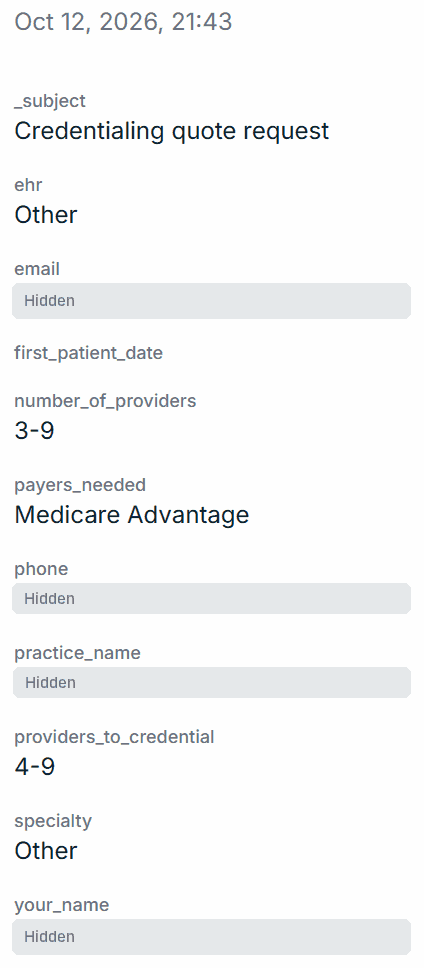
$100k+ lead
Aged AR audit request
Physical medicine and rehab · $250k–$1M unpaid over 90 days
Quilven · 19 October 2026
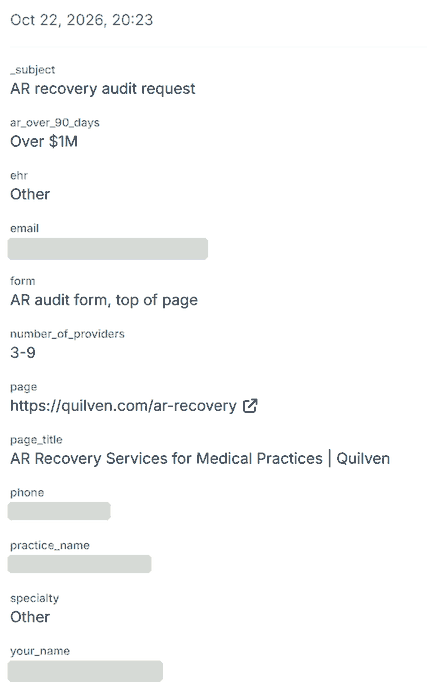
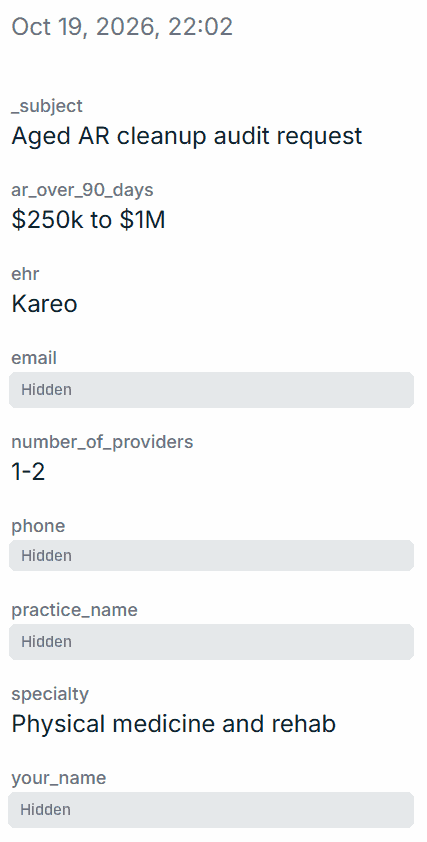
$100k+ lead
AR recovery audit request
3–9 providers · over $1M unpaid over 90 days
Quilven · 22 October 2026
Read the full messages on our reviews page, or see how the Quilven leads came in. Worked with us? Review us on Trustpilot.
See where you stand on the map.
Get a free audit of your Google Business Profile and website. You’ll see where you appear on the map, who’s above you and what to fix first.
- Your profile compared with the top three
- Findings within 24 hours, in plain English
- No obligation and no hard sell
Get your free SEO audit
Or book a free 20-minute call instead. It takes 30 seconds.