Google business listing phone call scam: how to spot it, and how to stop it
If a caller says your Google listing is at risk and asks for money, card details or a code, it isn’t Google. Your Business Profile is free, and Google says it never asks for payment over the phone. Here’s how to tell a real Google call from a scam, and how to stop the calls in Ireland.

Updated 10 min read
Free website audit or SEO consultation
No obligation. Trusted by 10+ clients.
Free SEO auditFindings by email within 24 hours.
Get my free auditIs that call really from Google?
Almost never, if it’s about your listing and it wants something from you. Google does make some automated calls to businesses, for things like checking your opening hours or booking for a customer. It won’t ask you to pay, sign up or read out a code.
Scam
Pay, press 1 or read a code
Any call that wants money, card details, remote access or the code Google just texted you. Hang up and don’t press anything.
Not Google
“We work with Google”
Usually a company selling marketing. It can be a real business, but it isn’t Google, and it can’t promise you first place.
Real
Checking your opening hours
An automated call that says it’s from Google Maps and asks about your hours or services. It never asks for money.
You’re not the only one getting these calls. Research for ComReg, the Irish phone regulator, found over 5,000 Irish businesses fell victim to fraud after scam calls and texts in 2022 alone.
When Google really calls a business
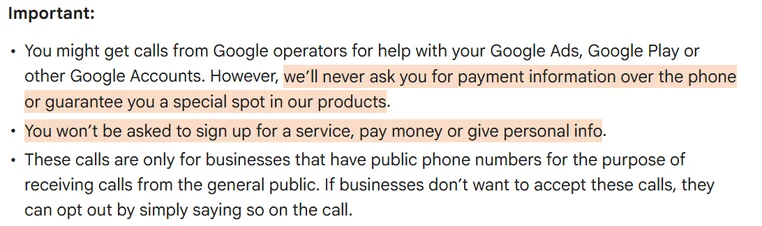
Google calls businesses for a few set reasons, from a set of designated numbers. The call says it’s from Google and why it’s calling. It never asks you to pay.
Google’s Business Profile help lists what a real call is for:
- Checking your detailsYour opening hours, or whether you offer a service, so your profile stays right.
- Customer requestsBooking an appointment or checking a price for someone who asked Google. This is only in some regions and languages.
- Google Ads, Google Play or your Google accountA person from Google may call for help with these. They still won’t ask for payment details. For Google Ads calls, see why is Google Ads calling me.
Answers you give on an automated call can be added to your profile. They’re marked Pending while Google reviews them, which can take up to five working days. If you don’t want these calls, say so on the call, or turn them off in your Business Profile’s advanced settings. That’s all in Google’s page about automated calls and texts.
| A real Google call | A scam call | |
|---|---|---|
| Who it says it is | Google, and why it’s calling | “Google”, “Google Business Support” or a “Google partner” |
| What it asks for | Your hours, your services, or a booking for a customer | Payment, card details, a code or remote access |
| Pressure | None. You can say no and opt out | “Your listing goes offline today” |
| Promises | None | First place on Google or Maps |
| Cost | Free | A fee to “verify”, “protect” or “fix” your listing |
From Google’s help pages on fraudulent calls and texts and telemarketing calls, read on 18 November 2026.
Words you’ll hear
| Word | What it means |
|---|---|
| Business Profile | Your free business listing on Google Search and Maps. It used to be called Google My Business. |
| Robocall | A call with a recorded voice, often asking you to press a number. |
| Spoofing | Faking the number that shows on your phone, so a call from abroad looks Irish. |
| Vishing | Voice phishing: a call that tries to get personal or financial details out of you. |
| Verification code | A short code Google sends by text or email. Whoever has it can get into your account or profile. |
| Third party | Google’s word for an agency that manages a profile for a business it doesn’t own. |
| NDD opt-out register | Ireland’s register of phone numbers that don’t want marketing calls. |
The scam calls Irish businesses get
Most follow a few scripts. Each one breaks a rule Google sets for itself, so you can catch it in seconds.
- “Your Google listing will be removed. Press 1.”Google says it does not place robocalls to sell you anything, and that you shouldn’t press any buttons, even if the voice tells you to.
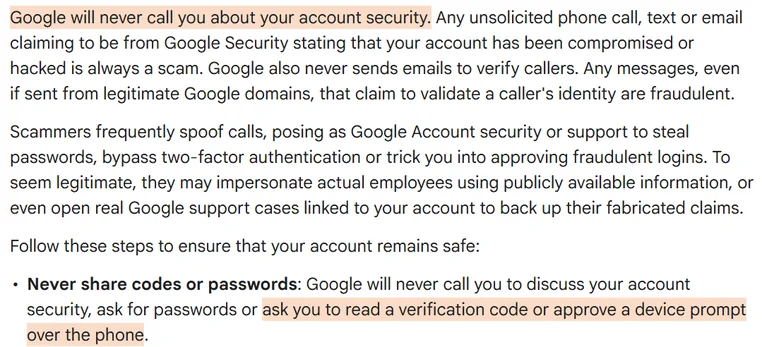
- “Read me the code we just sent you.”The caller is trying to get into your account or your profile. Google never asks you to read a verification code over the phone.
- “Your listing isn’t verified. It’s €199 to fix.”Google doesn’t charge to be on Google Search or Maps. Verifying your profile is free, and you do it yourself.
- “We’re Google partners. We’ll get you to number one.”Google never guarantees top placement, and its rules ban agencies from promising it.
- “We’re calling to update your front page listing.”Google’s own words: it does not call to update your front page listing or to give you a free website.
- An invoice for your Google Maps listingGoogle doesn’t charge for inclusion in Google Maps. Don’t pay an invoice you can’t match to work you ordered.
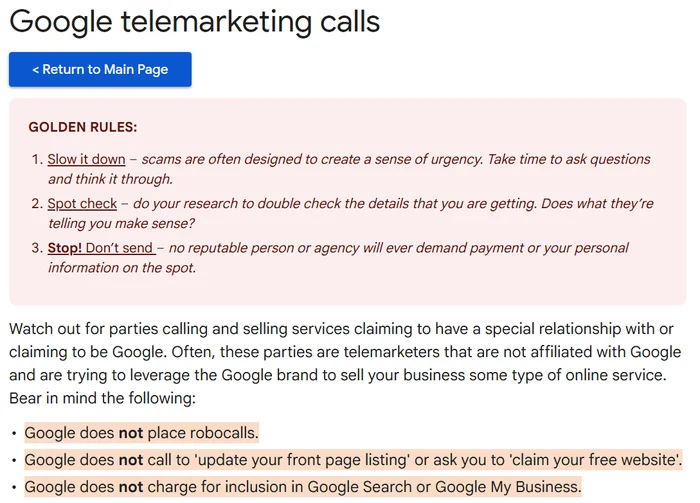
Sources: Google’s pages on telemarketing calls, top placement scams, fake Google Maps invoices and account security calls.
Is this call from Google? Check it in 30 seconds
Tick what the caller did or said. We’ll tell you what you’re dealing with.
Based on Google’s own help pages. Everything runs in your browser: nothing you tick is sent anywhere.
What to do on the call
Hang up. Don’t press any buttons, don’t give any codes, and check your profile yourself afterwards.
Hang up. Google’s advice for anyone pretending to be Google is simple: hang up, and don’t press any buttons, even if the voice tells you to. Pressing buttons can lead to more calls.
Never read out a code. Google never asks you to read out a verification code or approve a sign-in over the phone.
Never pay on the call. No card numbers, no bank transfers, no “one-off verification fee”.
Don’t let them into your computer. Don’t install anything a caller asks you to.
Check your profile yourself. Sign in to your Business Profile the way you always do, not from a link a caller sends. If something’s really wrong, you’ll see it there.
ComReg’s advice is the same: don’t follow instructions from a recorded message, and don’t call back numbers you don’t recognise.
If you’ve already paid or given a code
Act fast. Ring your bank about any payment, lock down your Google account, then check who can manage your profile.
- Ring your bankIf you paid by card or transfer, call the number on the back of your card and tell them it was a scam.
- Change your Google passwordThen run Google’s Security Checkup and sign out any devices you don’t know.
- Check who manages your profileIn your Business Profile, open the people and access settings. Remove anyone you don’t know, and make sure you’re the owner.
- Report it to the GardaíComReg’s advice: contact your local Garda station or visit garda.ie if you’ve fallen for a scam.
- Report it to GoogleUse Google’s third-party complaint form. Add the caller’s company name, number and any emails they sent.
Watch out for a second call afterwards. ComReg warns that people who’ve been scammed can be contacted by other scammers offering to get the money back, for a fee.
How to stop the calls in Ireland
You can’t stop every scam call, but you can cut them down. Block repeat numbers, put your business number on the opt-out register, and turn off Google’s own calls if you don’t want them.
Google’s own page on these calls tells you to report them in the United States. In Ireland, use these instead:
| What to do | What it stops | How |
|---|---|---|
| Block the number | Repeat calls from the same number | Ask your phone company to block it, as ComReg suggests, or block it on your phone |
| NDD opt-out register | Marketing calls from inside Ireland | Ask your line provider. It’s free, and it covers business numbers too |
| Mobile numbers | Marketing calls you never agreed to | Already banned under S.I. 336 of 2011, unless you agreed to them |
| Google’s automated calls | Real calls from Google checking your details | Say so on the call, or turn them off in your Business Profile settings |
| Report a scam | Helps the Gardaí and Google act | Your local Garda station, and Google’s complaint form |
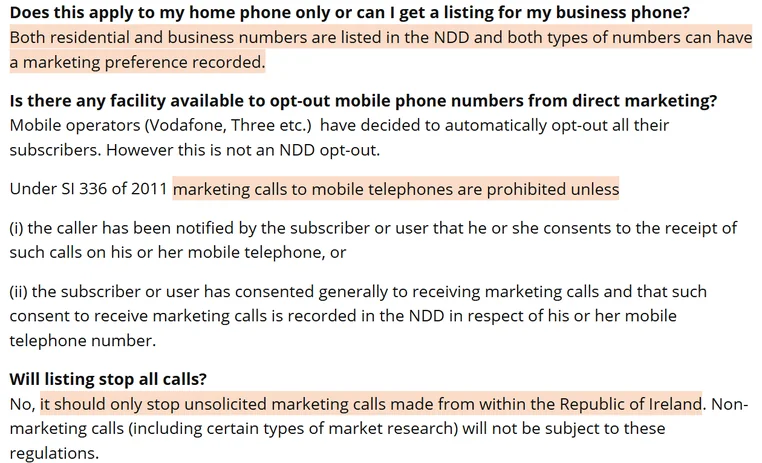
Be clear on what the register does. The Data Protection Commission says it only stops marketing calls made from within the Republic. Scammers ignore it, and ComReg says going ex-directory won’t stop scam calls either. So it cuts the sales calls, not the fraud.
ComReg has also been working with phone companies to block calls from abroad that fake Irish numbers.
Agencies that say they’re “with Google”
A marketing company can ring you to sell SEO. That’s allowed. Pretending to be Google, promising first place or threatening your listing is not, under Google’s own rules for agencies.
Google calls these agencies third parties. Its third-party policies ban them from:
- Posing as GoogleThrough robocalls, or with names like “Google Support Team” or “Google certified”.
- Guaranteeing top placementOr claiming your profile will show on Google at all times.
- Selling free Google products as paid onesYour Business Profile costs nothing to set up or keep.
- Threatening you’ll lose your profileIf you don’t sign up with them.
- Keeping a profile hostage for moneyYou must always stay the owner of your own profile.
- Excessive cold callsWithout respect to do-not-call lists.
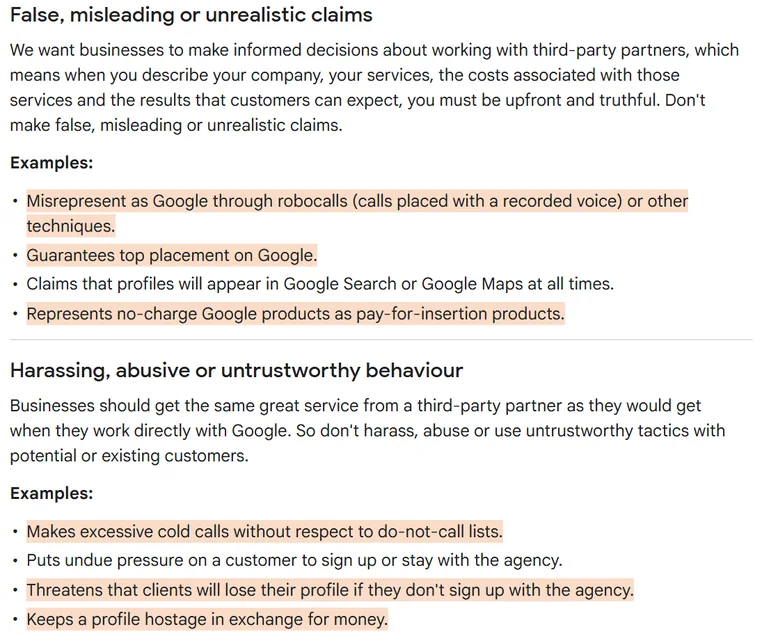
An honest agency says who it is, tells you the profile is free, and lets you stay the owner while it works as a manager. If it charges a fee to manage your profile, Google says it must tell you in writing first. Any agency that breaks these rules can be reported on the same complaint form.
Is your listing really at risk?
Not because someone rang you. Google says its own calls don’t affect your account standing, and it doesn’t charge to keep you on Maps.
Profiles do get suspended, usually for breaking Google’s rules on names, addresses or categories. You can check that yourself with Google’s verification status tool, not through a caller. Our free Profile Rescue Kit shows how to check your status and get back.
New to all this? Start with how to get your business on Google Maps. It’s free, and you verify the profile yourself, with no one on the phone. There’s more on getting found in our Google Business Profile guides.
When to get help
If you’ve had a scare and want someone to check your profile, who has access to it and whether it’s set up right, that’s what our Google Business Profile management is for. Whoever helps you should be added as a manager while you stay the owner, as Google’s own rules for agencies say.
Questions people ask
Something else on your mind? Email info@leadsireland.com.
Does Google call businesses about their listing?
Sometimes, with automated calls to check your opening hours or services, or to book for a customer. The call says it’s from Google and why. It never asks for money, card details or a code, and you can opt out by saying so on the call.
Is the “your Google listing will be suspended” call a scam?
Yes. Google doesn’t place robocalls to sell you anything, and it says its own calls don’t affect your account standing. Hang up and don’t press any buttons. Check your profile yourself by signing in as you normally would.
Does Google charge for a Business Profile?
No. A Google Business Profile is free, and Google doesn’t charge for inclusion in Google Search or Google Maps. Agencies can charge for managing it, but they must tell you the profile itself is free.
What happens if I gave the caller a code?
They may be trying to get into your Google account or profile. Change your Google password, run Google’s Security Checkup, and check who can manage your Business Profile. Remove anyone you don’t know.
How do I stop scam calls to my business in Ireland?
Ask your phone company to block repeat numbers, and put your business landline on the NDD opt-out register through your line provider. The register stops Irish marketing calls, not scams, so hang up on anyone who asks for money or a code.
Where do I report a Google scam call in Ireland?
To your local Garda station or garda.ie if you lost money or details, and to Google through its third-party complaint form. Include the caller’s company name, number and any emails they sent.
Can an SEO company guarantee first place on Google Maps?
No. Google never guarantees top placement, and its rules for agencies ban promising it. Treat any guarantee as a warning sign.
Are marketing calls to my mobile legal in Ireland?
Not unless you agreed to them. Under S.I. 336 of 2011, marketing calls to mobile phones need your consent, the Data Protection Commission says. Scammers ignore the law, so hang up and block the number.
Reviews and real leads
What clients say about Essa’s work. And leads that came in through sites he does SEO for.
“Since then, my site ranks higher and more people find it on Google. … I’d recommend him to anyone who needs help with SEO.”
“He’s an incredibly talented and knowledgeable individual, not only in SEO but in various fields. … He has constantly delivered phenomenal outputs.”
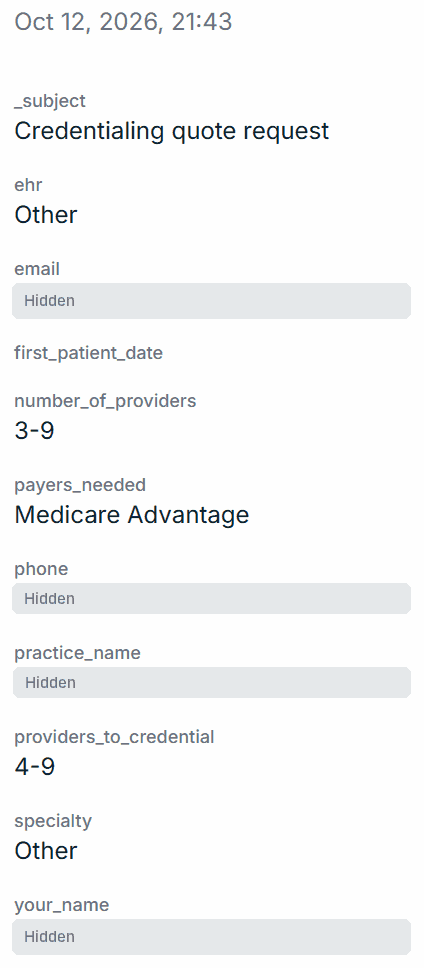
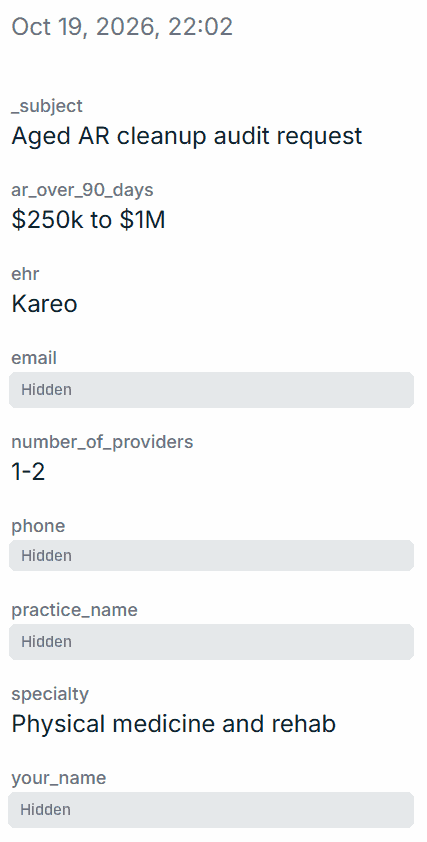
$100k+ lead
Aged AR audit request
Physical medicine and rehab · $250k–$1M unpaid over 90 days
Quilven · 19 October 2026
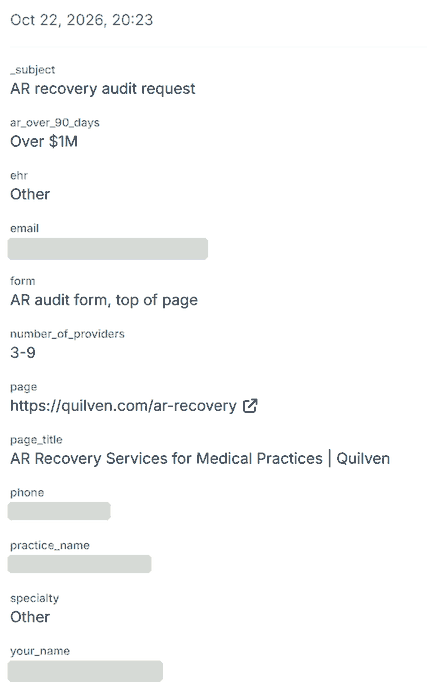
$100k+ lead
AR recovery audit request
3–9 providers · over $1M unpaid over 90 days
Quilven · 22 October 2026
Read the full messages on our reviews page, or see how the Quilven leads came in. Worked with us? Review us on Trustpilot.
Want a straight answer about your Google profile?
Get a free audit of your Google Business Profile and website. We check what customers see, who has access, and what to fix first. Nobody pretending to be Google.
- Your profile, listing and website checked
- Findings within 24 hours, in plain English
- No obligation and no hard sell
Get your free SEO audit
Or book a free 20-minute call instead. It takes 30 seconds.