How to set up Google Ads for a local business in Ireland
Google’s sign-up takes three steps. The settings after it decide whether your money brings calls or clicks from the wrong people. Here’s the order to do it in, the defaults to change, and the Irish details to budget for.

Updated 7 min read
Free Google Ads setup plan or consultation
No obligation. Trusted by 10+ clients.
Setting up Google Ads?Reply within one working day.
Free Google Ads setup planThe short answer
Google’s sign-up takes three steps: your business details, your goals and budget, then payment. It offers conversion tracking as the final step. Don’t skip it. Before you launch, set the location to people in your area, set a budget from what a lead is worth, block the searches you don’t want, and send each ad to the page for that service.
- Own the accountYour Google account, your card, and Admin access for you.
- Change the defaultsLocation, budget and keywords, before the first click.
- Track before you spendCalls and forms counted from day one.
- Sign-up
- 3 steps: business details, goals and budget, payment
- Who owns it
- You, with Admin access
- Location
- Choose “Presence”: people in or regularly in your areas
- Budget
- An average daily budget. Up to 2 times it on one day, never more than 30.4 times it a month
- Tracking
- Calls and forms, set up before launch
- Ad review
- Most ads within one business day
- VAT in Ireland
- 23% on top of your ad spend
What to have ready before you start
Four things make the setup quicker and the ads better from day one.
- A Google Business ProfileLinked to Google Ads, your profile’s locations can show as location assets: your address and a map on the ad.
- A page for each serviceEach ad should land on the page for that job. See what makes a good service page.
- A budgetWork it out from what a lead is worth. Our guide shows how to set a Google Ads budget.
- Someone to answer the phoneAn ad that rings out to voicemail wastes the click you paid for.
How to set up Google Ads, step by step
- Create the account in your own name. Use your own Google account and your own card. You pay Google directly, so you see every euro.
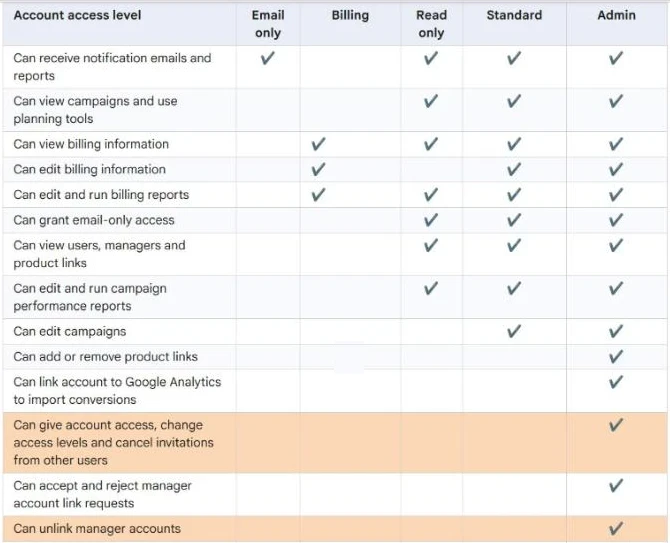
- Keep Admin access. Google has five access levels. Only Admin can give access, change access levels and unlink a manager account. Give anyone who runs your ads Standard.
- Start with one service. One campaign for your best service in your best area. A small budget spread across six services teaches the account nothing.
- Set the location option to “Presence”. Google’s default, “Presence or interest”, also reaches people who only show interest in your area.
- Set an average daily budget. Google won’t charge more than 30.4 times it in a month. Start from what a lead is worth to you.
- Add keywords and negative keywords. The searches your customers use, and a list of ones to block, such as “jobs” and “free”. Negative keywords don’t catch close variants, so add the other versions too.
- Write ads that match the page. Send each ad to the page for that service. Add call assets so people can ring from the ad.
- Set up conversion tracking. Count calls and forms as conversions, and test them before you spend. See how to track calls and forms from Google Ads.
- Launch and check the search terms. Most ads are reviewed within one business day. Then check the real searches every week. Our guide on how to read your Google Ads data shows what to look for.
The defaults worth changing
| Setting | Default or easy option | Better for a local business |
|---|---|---|
| Location option | Presence or interest | Presence: people in or regularly in your areas |
| Budget | A round number | Worked out from a lead’s value |
| Keywords | Broad ideas | Your services, plus negative keywords |
| Landing page | The homepage | The page for that service |
| Tracking | The optional last step | Calls and forms, tested before launch |
| Phone number | Left off | Call assets on every ad |

Which keyword match type to start with
Google gives every new keyword broad match unless you choose otherwise. Broad match reaches the most searches, and exact match the fewest.
| Match type | How you write it | What it can show for |
|---|---|---|
| Broad | plumber cork | Searches related to your keyword, even ones without its words. Google’s default |
| Phrase | “plumber cork” | Searches that include the meaning of your keyword |
| Exact | [plumber cork] | Searches with the same meaning or intent as your keyword |
On a small local budget, phrase and exact match give you more control while you learn which searches bring calls. Google says broad match works best with Smart Bidding, which needs conversion tracking to learn from. Whichever you pick, check the search terms every week.
From Google Ads Help, About keyword matching options, checked 23 November 2026.
Google Ads setup terms, explained
Google Ads uses its own labels for almost everything. Here’s what you’ll meet during setup.
| Term | What it means |
|---|---|
| Google Ads account | Where your campaigns, billing and access live. Keep it in your own name |
| Manager account | A separate Google Ads account agencies use to manage several client accounts from one place |
| Admin access | The top access level. Only Admin can give access, change access levels and unlink a manager account |
| Campaign | A set of ads with its own budget, location and goal |
| Ad group | Keywords and ads for one service, inside a campaign |
| Keyword | A word or phrase you want your ads to show for |
| Negative keyword | A word you block, such as “jobs” or “free” |
| Search term | What someone actually typed before your ad showed |
| Presence | The location option that targets people in, or regularly in, your areas |
| Average daily budget | What you’re happy to spend a day, on average. Up to 2 times it on one day, never more than 30.4 times it in a month |
| Conversion | An action you count as a result, like a call or a form |
| Call and location assets | Extras on your ad: a button to ring you, and your address and a map |
The Irish details to budget for
- VAT on top of your spendGoogle charges VAT at the Irish rate, currently 23%. If you’re VAT registered, ask your accountant about reclaiming it.
- The right CorkTown names repeat. Our page on Google Ads in Cork shows why picking the right one matters.
- Pay-per-lead ads for tradesFor 29 trade categories in Ireland, Local Services Ads sit above the search ads.
When to get help
You can set up a small account yourself with the steps above. It’s worth getting help if the account will spend real money from day one, or if an old agency set it up in its own name. Our Google Ads setup is included in every Google Ads plan, from €250 a month plus VAT, with no setup fee.
Questions people ask
Something else on your mind? Email info@leadsireland.com.
How do I set up Google Ads for my business?
Sign up with your own Google account: business details, goals and budget, then payment. Then set the location option to people in your area, set a budget from a lead’s value, add negative keywords, point each ad at the right page and set up call and form tracking before launch.
How long does Google Ads take to go live?
Google reviews most ads within one business day. If an ad is under review for more than a week, Google says to contact support.
Should I use the default location setting?
Usually not for a local business. Google’s default also reaches people who only show interest in your area. “Presence” shows ads to people in or regularly in it.
Do I need a Google Business Profile for Google Ads?
It helps. Linked to Google Ads, your profile’s locations can show as location assets, with your address and a map on the ad.
Is there VAT on Google Ads in Ireland?
Yes. Google charges VAT at the Irish rate, currently 23%, on top of your ad spend.
Which keyword match type should I use in Google Ads?
Broad match is Google’s default and reaches the most searches. On a small local budget, phrase and exact match give you more control while you learn which searches bring calls. Check the search terms every week, whichever you choose.
What is a Google Ads manager account?
A separate Google Ads account that lets agencies view and manage several client accounts from one place. You don’t need one for your own business. Keep your own account, with Admin access, and give your agency Standard access.
Reviews and real leads
What clients say about Essa’s work. And leads that came in through sites he does SEO for.
“Since then, my site ranks higher and more people find it on Google. … I’d recommend him to anyone who needs help with SEO.”
“He’s an incredibly talented and knowledgeable individual, not only in SEO but in various fields. … He has constantly delivered phenomenal outputs.”
$100k+ lead
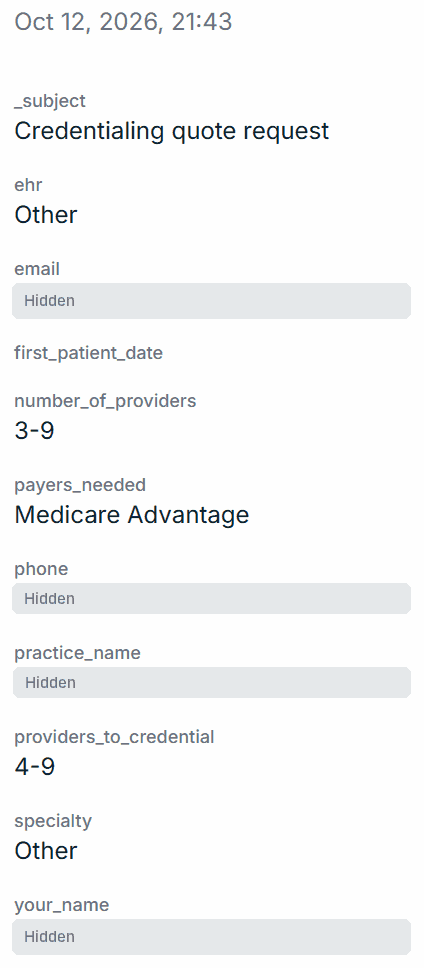
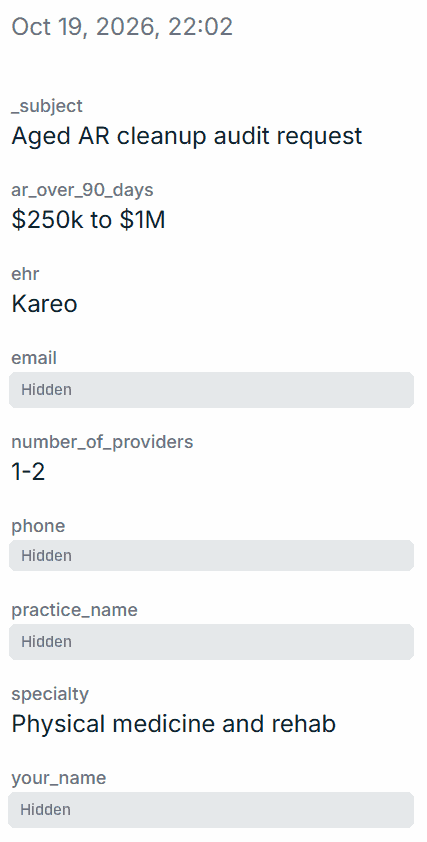
Aged AR audit request
Physical medicine and rehab · $250k–$1M unpaid over 90 days
Quilven · 19 October 2026
$100k+ lead
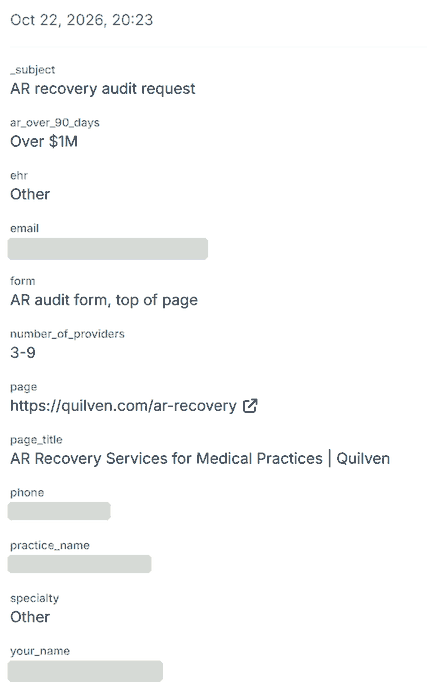
AR recovery audit request
3–9 providers · over $1M unpaid over 90 days
Quilven · 22 October 2026
Read the full messages on our reviews page, or see how the Quilven leads came in. Worked with us? Review us on Trustpilot.
Want it set up right the first time?
Tell Essa what you do and where. He’ll reply with how he’d set up your account: areas, budget, keywords and tracking.
- Areas, budget and tracking planned
- A reply within one working day, in plain English
- No obligation and no hard sell
Get your free Google Ads setup plan
Or book a free 20-minute call instead. It takes 30 seconds.